
• Lessons from 15 Years of Amazon Experience: Navigating the Evolving Marketplace

    Lessons from 15 Years of Amazon Experience: Navigating the Evolving Marketplace

    Alright, gather ’round, fellow sellers, and let’s pull up a virtual chair for a bit of seasoned wisdom. In the ever-evolving world of Amazon, 15 years is practically an eternity. It’s seen the rise and fall of countless trends, the birth and death of numerous strategies, and enough algorithm updates to make your head spin.

    Today, we’re tapping into that deep well of experience to share some invaluable lessons learned from navigating the Amazon marketplace for over a decade and a half. Consider this your shortcut to avoiding some common pitfalls and accelerating your own journey to success.

    The Amazon Time Warp: Things Change Faster Than You Think

    Fifteen years ago, the Amazon landscape was a vastly different beast. The competition was less fierce, the rules were a bit more… shall we say, “flexible,” and the strategies that worked then might get you suspended faster than a rogue helium balloon today. The biggest lesson from this long haul? Adaptability is not just a virtue; it’s a survival skill. What works today might be obsolete tomorrow, so staying informed, being willing to pivot, and embracing change are paramount.

    Lesson 1: The Customer is Always Right (Even When They’re Wrong)

    This old adage holds even more weight on Amazon. Your entire business hinges on customer satisfaction. While you might encounter the occasional unreasonable buyer, focusing on providing exceptional service, responding promptly to inquiries, and going the extra mile (within reason, of course) builds trust, fosters positive reviews, and ultimately leads to long-term success. Remember, a happy customer is a repeat customer, and on Amazon, positive reviews are gold.

    Lesson 2: Catalog Health is Non-Negotiable

    Over the years, one thing has become crystal clear: a healthy catalog is a profitable catalog. This means meticulous attention to detail in your listings (as we discussed earlier!), accurate inventory management, and strict adherence to Amazon’s ever-evolving policies. A single policy violation or a listing error can have significant consequences. Treat your catalog like the vital organ of your business – nurture it, protect it, and address any issues immediately.

    Lesson 3: Reviews are Social Currency (Treat Them Accordingly)

    Reviews have always been important, but their influence has only grown. They are the social proof that builds trust and drives conversions. While actively soliciting positive reviews in a compliant way is crucial, so is diligently monitoring and addressing negative feedback (even the unfair ones, as we discussed!). A thoughtful and professional response to a negative review can sometimes turn a disgruntled customer into a loyal advocate.

    Lesson 4: Diversification is Your Safety Net (Don’t Put All Your Eggs in One ASIN)

    Relying heavily on a single product, no matter how successful it is, is a risky game. Market trends change, competition emerges, and even Amazon’s algorithms can shift, impacting a single ASIN’s performance. Building a diverse portfolio of products mitigates risk and creates more opportunities for growth.

    Lesson 5: Automation is Your Friend (Embrace Efficiency)

    In the early days, many tasks were manual and time-consuming. Today, a plethora of tools and automation solutions exist to streamline everything from inventory management to repricing to customer communication. Embracing automation frees up your time to focus on strategic growth initiatives rather than getting bogged down in repetitive tasks.

    Lesson 6: Data is Your Compass (Make Informed Decisions)

    Gut feelings can sometimes play a role in business, but on Amazon, data should be your primary guide. Pay close attention to your sales metrics, conversion rates, keyword rankings, advertising performance, and customer feedback. Analyze this data to identify trends, understand what’s working (and what’s not), and make informed decisions about pricing, product development, and marketing strategies.

    Lesson 7: Community and Networking are Invaluable (You’re Not Alone on This Journey)

    The Amazon selling journey can sometimes feel isolating. Connecting with other sellers, sharing experiences, and learning from each other can provide invaluable support, insights, and even partnership opportunities. Engage in online communities, attend industry events, and build your network.

    Lesson 8: Compliance is King (Don’t Skirt the Rules)

    Amazon’s policies are there for a reason, and while they can sometimes feel complex, adhering to them is non-negotiable. Trying to game the system or engage in black-hat tactics will almost certainly lead to account suspension. Play by the rules, stay updated on policy changes, and build a sustainable business on a solid foundation of compliance.

    Lesson 9: Long-Term Vision Trumps Short-Term Gains (Think Beyond Next Week’s Sales)

    While hitting sales targets is important, building a successful Amazon business requires a long-term perspective. Focus on building a strong brand, providing consistent value to your customers, and adapting to the evolving marketplace. Sustainable growth takes time and effort.

    Lesson 10: Never Stop Learning (The Amazon Landscape Never Stands Still)

    The Amazon marketplace is a dynamic and ever-changing environment. What worked yesterday might not work today, and new strategies and tools are constantly emerging. A commitment to continuous learning – staying updated on Amazon’s policies, exploring new tools and strategies, and adapting to market trends – is crucial for long-term success.

    Dad Joke Break: Why did the experienced Amazon seller always stay ahead of the curve? Because they had fifteen years of practice making sharp turns!

    Lessons Learned

    Learn from the journeys of those who have navigated the Amazon marketplace for the long haul! These lessons from 15 years of experience can help you avoid common pitfalls and accelerate your path to sustainable success.

    Share your own key learnings in the comments below!

    For more in-depth insights and strategies for navigating the complexities of Amazon selling, explore our resources.
  • The Compound Effect of Fixing 3 ASINs per Month: Small Tweaks, Big Leaps in Your Amazon Success

    The Compound Effect of Fixing 3 ASINs per Month: Small Tweaks, Big Leaps in Your Amazon Success

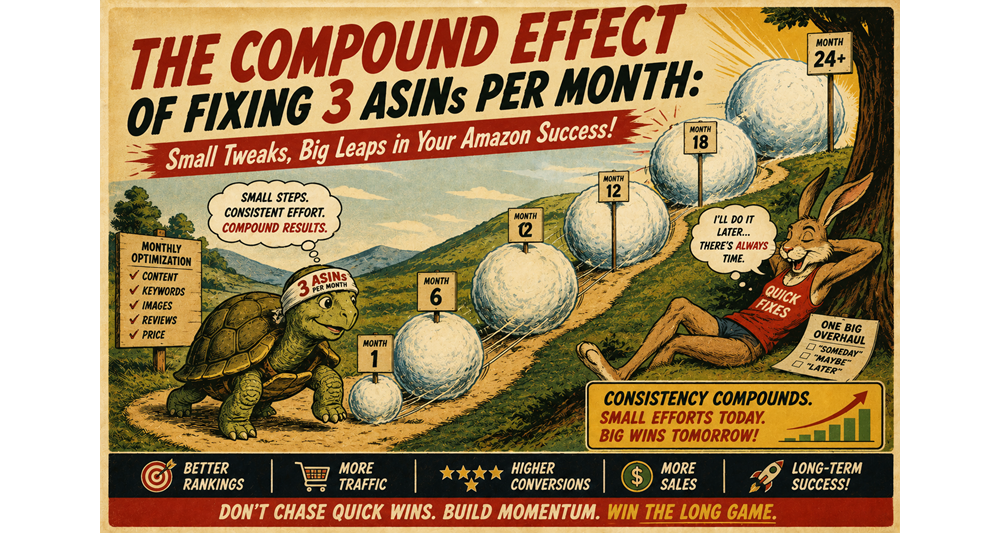
    Alright, let’s talk about growth on Amazon. It’s not always about those massive, overnight successes you see in the headlines. Often, real, sustainable growth comes from consistent, incremental improvements. Think of it like compound interest – small actions, repeated over time, can lead to surprisingly significant results.

    Today, we’re going to explore the “compound effect” of fixing just three ASINs per month.

    Sounds manageable, right?

    Let’s see how those little tweaks can snowball into big wins for your Amazon business.

    The “One Big Fix” Myth: Why Gradual Wins the Race

    Many sellers fall into the trap of thinking they need one massive overhaul to see significant growth. They dream of that one magic bullet, that single strategy that will suddenly skyrocket their sales. While big changes can sometimes be necessary, relying solely on them can lead to procrastination and overwhelm.

    The beauty of focusing on a few ASINs each month is that it’s achievable, less daunting, and allows for focused attention on making meaningful improvements.

    The Math of Small Improvements: Prepare for Some Simple (and Encouraging) Arithmetic

    Let’s imagine you have, say, 20 ASINs in your catalog. If you commit to fixing just three of them each month, what happens over time?

    • Month 1: 3 ASINs receive targeted improvements.
    • Month 2: Another 3 ASINs get the TLC they deserve (now 6 total improved).
    • Month 3: Yet another 3 ASINs are optimized (now 9 total).
    • Month 6: You’ve systematically touched and hopefully improved 18 out of your 20 ASINs.
    • Month 7 (and beyond): You’re now cycling back to your initially improved ASINs, armed with new data and insights to further refine them. This isn’t a one-and-done deal; it’s a continuous cycle of improvement.

    Now, what exactly does “fixing” an ASIN entail? It’s not about slapping on a few extra keywords and calling it a day. It’s about making meaningful improvements that address key areas affecting performance. This could involve:

    • Optimizing the title and bullet points: Focusing on high-converting keywords, improving readability, and clearly highlighting key benefits. Even a small increase in click-through rate (CTR) can lead to more traffic and sales.
    • Enhancing the product description: Crafting compelling and informative descriptions that answer customer questions and paint a vivid picture of the product’s value. Better descriptions can boost conversion rates.
    • Improving product images: Ensuring high-quality, visually appealing images that showcase the product from multiple angles and highlight key features. Good visuals are crucial for online sales.
    • Updating backend keywords: Regularly researching and implementing relevant backend keywords that might be missed in the front-end content, expanding your reach in search results.
    • Analyzing and responding to customer feedback: Identifying recurring issues or questions in reviews and Q&A, and then updating the listing to address them proactively. This can reduce negative feedback and improve customer satisfaction.
    • A/B testing pricing or promotional strategies: Experimenting with small changes to pricing or running targeted promotions on specific ASINs to see what resonates with your audience.
    • Reviewing category and browse node placement: Ensuring your product is in the most relevant categories to maximize visibility.

    The Snowball Effect: How Small Fixes Lead to Big Wins

    The magic of fixing three ASINs per month isn’t just about the number of listings you improve; it’s about the compounding effect of those improvements. Here’s how it works:

    • Increased Visibility: Better keywords and optimized content lead to higher rankings in search results, meaning more potential customers see your product.
    • Higher Click-Through Rates (CTR): Compelling titles and engaging visuals entice more shoppers to click on your listing.
    • Improved Conversion Rates: Detailed descriptions, high-quality images, and addressed customer concerns lead to more purchases once shoppers land on your page.
    • More Positive Reviews: By addressing customer feedback and providing clearer information, you can reduce negative reviews and increase positive ones, further boosting social proof and conversion rates.
    • Increased Sales Velocity: The combination of higher visibility and better conversion rates leads to more sales, which in turn can improve your organic ranking and create a positive feedback loop.
    • Reduced Advertising Costs: As your organic ranking improves, you may be able to reduce your reliance on paid advertising, leading to higher profit margins.
    • Stronger Overall Account Health: Consistent attention to your listings contributes to a healthier Amazon account, making you less susceptible to suspensions and other issues.

    The “Don’t Be a Perfectionist” Caveat: Progress Over Perfection

    It’s important to note that “fixing” an ASIN doesn’t mean achieving absolute perfection. The goal is to make meaningful improvements based on data and best practices. Don’t get bogged down trying to make every single listing flawless in one go. Focus on making progress on those three ASINs each month, and the cumulative effect will be far more impactful than striving for unattainable perfection across your entire catalog simultaneously.

    Dad Joke Break: Why did the Amazon seller only fix three ASINs a month? Because they wanted to take things one listing at a time!

    Compounding Success

    Stop chasing the elusive “magic bullet” and embrace the power of consistent improvement! Commit to fixing just three ASINs each month and witness the compound effect transform your Amazon success.

    To learn more about prioritizing which ASINs to optimize first and data-driven strategies for listing improvement, click here.

  • Using AI to Flag Suspicious Reviews in Seconds

    Using AI to Flag Suspicious Reviews in Seconds

    Alright, buckle up, future-forward folks! We’re entering the realm of artificial intelligence and automation, and trust me, it’s not as scary as it sounds. In fact, it can be your secret weapon in the ongoing battle against those sneaky, suspicious Amazon reviews.

    Today, we’re going to talk about leveraging the power of AI to flag potentially problematic reviews faster than you can say “Seller Central notification overload.”

    The Problem: Humans vs. Mountains of Reviews

    Let’s be real. As your Amazon business grows, so does the influx of customer reviews. Sifting through hundreds, even thousands, of reviews to identify the genuinely problematic ones (the ones that violate guidelines, are clearly fake, or seem malicious) can feel like searching for a specific grain of sand on a very large beach. It’s time-consuming, tedious, and frankly, a task that could be better spent on more strategic activities.

    Enter AI: Your New Review-Sniffing Sidekick

    If you’ve used AI (and most of us have by now), you’ve seen what it can do. When it comes to reviews, think of it as a super-smart digital assistant that can read and analyze text with incredible speed and efficiency.

    We can harness this power to help us identify potentially suspicious reviews.  

    How Can AI Help Flag Suspicious Reviews?

    Here’s where the magic happens. By feeding AI examples of Amazon’s review guidelines and examples of both legitimate and suspicious reviews, we can train it to identify patterns and characteristics that often indicate a problem.

    Here are some ways AI can be your review-flagging superhero:

    • Identifying off-topic content: GPT can quickly recognize reviews that talk about shipping, packaging (unless directly related to the product’s condition upon arrival), or other seller-specific issues that shouldn’t be in the product review section.
    • Spotting promotional language: GPT can be trained to detect phrases and keywords that suggest a review is actually an advertisement for another product or service.
    • Detecting unusual language patterns: Fake or incentivized reviews often have generic, overly positive, or repetitive language. GPT can learn to flag these anomalies.  
    • Recognizing potential bias: While trickier, GPT can be trained to identify reviews that use language suggesting a personal relationship or a clear incentive.
    • Summarizing review content: Even if GPT doesn’t definitively flag a review, it can quickly summarize the content, allowing you to assess it more efficiently.

    A Simple Workflow: AI in Action

    Here’s a basic outline of how you might use AI to flag suspicious reviews:

    1. Data Extraction: You’ll need a way to extract your recent Amazon reviews. This might involve manually copying and pasting (for smaller volumes) or using third-party tools that can automate this process.
    2. Prompt Engineering: This is where you give AI specific instructions. A simple prompt might look something like this:
    1. Feeding AI the Reviews: You would then input each review into GPT based on your prompt.
    2. Reviewing AI’s Output: AI will analyze each review and provide a “Suspicious” or “Not Suspicious” label along with its reasoning.
    3. Human Verification: This is crucial! AI is a powerful tool, but it’s not a perfect replacement for human judgment. You’ll need to review the reviews flagged as “Suspicious” by AI to determine if they genuinely violate Amazon’s policies and warrant reporting.

    Tools and Platforms (The Techy Bits):

    While you can directly interact with AI models through platforms like OpenAI’s API, several tools and integrations are emerging that make this process more user-friendly for Amazon sellers. Keep an eye out for e-commerce software that integrates AI-powered review analysis features.

    Important Caveats (The “Don’t Get Too Excited” Reminder):

    • AI is not foolproof: It can sometimes misinterpret context or flag legitimate reviews as suspicious. Human oversight is essential.
    • Prompt engineering is key: The accuracy of AI’s analysis heavily depends on the quality of your prompts and the criteria you provide.
    • Amazon’s policies are the ultimate authority: AI can help you identify potential violations, but Amazon’s interpretation of their guidelines is what ultimately matters.

    Dad Joke Break: Why did the AI get a promotion? Because it was outstanding in its field… of data analysis!

    Leverage AI Today

    Stop spending hours sifting through reviews! Explore the power of AI and automation with tools like GPT to quickly flag potentially suspicious feedback. This can save you valuable time and help you maintain a healthier listing.

    To learn more about integrating AI into your Amazon business, check out our resources.

    See exactly how reviews are flagged and removed.

  • ASIN Protection & Catalog Health: How Often Should You Check Your Listings?

    ASIN Protection & Catalog Health: How Often Should You Check Your Listings?

    Alright, let’s talk about your Amazon listings – your digital storefronts. Imagine opening a physical store and then… never checking if the shelves are stocked, the prices are right, or if someone has decided to replace your best-selling widget with a rubber chicken.

    Sounds crazy, right?

    Neglecting your Amazon listings can be just as detrimental. So, the big question is: how often should you be giving your ASINs some TLC?

    The “If It Ain’t Broke, Don’t Fix It?” Fallacy

    You might be thinking, “Hey, my listings are doing fine. Sales are steady. Why mess with a good thing?” That’s like saying your car runs fine, so you’ll skip oil changes. Sooner or later, you’re going to run into trouble. The Amazon landscape is constantly shifting – competitors change their listings, algorithms update, and errors can creep in unnoticed.

    Regular checks are essential for maintaining catalog health and protecting your ASINs.

    The 5×20 Rule Applied: Little and Often Wins the Race

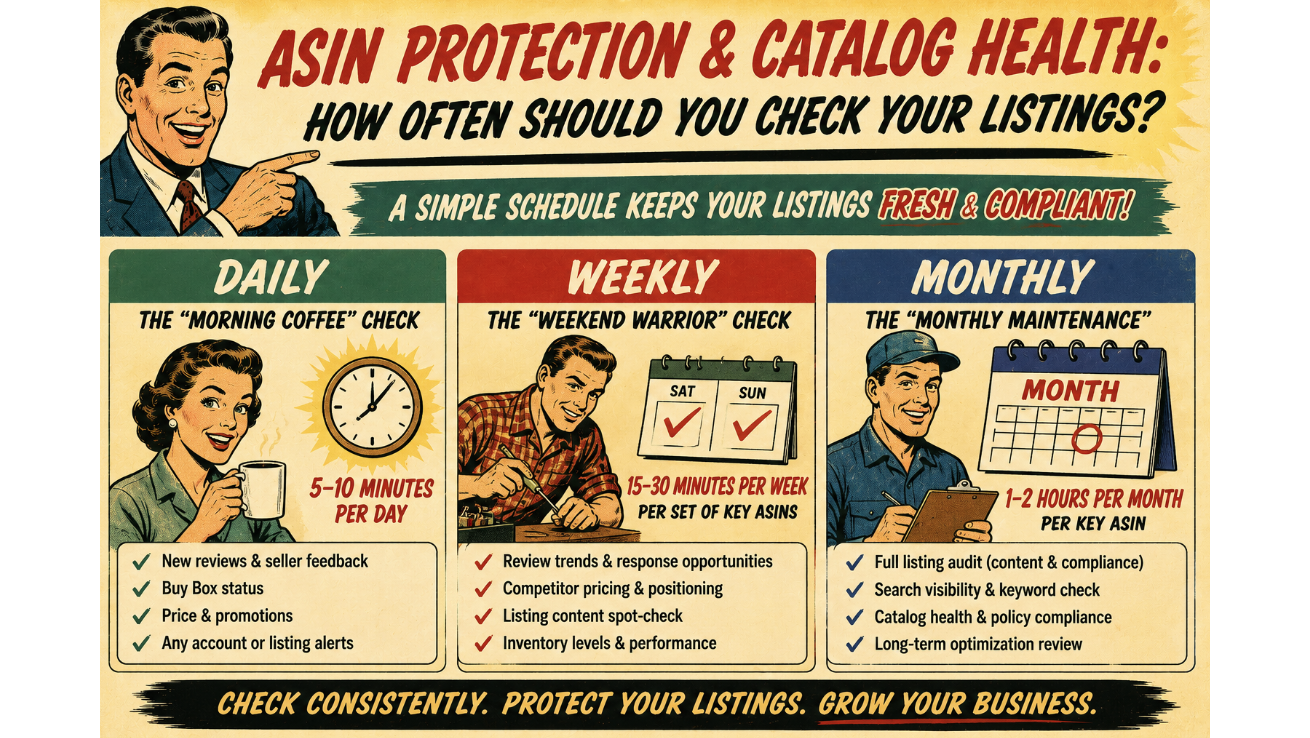
    Instead of one massive listing audit every blue moon, let’s think about the 5×20 rule. Small, consistent efforts yield big results over time. Here’s how that applies to checking your listings:

    • Daily (The “Morning Coffee” Check – 5-10 minutes per day):
      • Review recent customer feedback and questions: Keep an eye out for any product-related issues, inconsistencies in your listing, or potential problems customers are facing. Addressing these quickly can prevent negative reviews and build trust.
      • Monitor for listing hijackers: Unfortunately, the Wild West of the internet sometimes spills onto Amazon. Quickly scan your listing details (title, bullet points, images) to ensure no unauthorized sellers have jumped on and changed crucial information.
      • Check for suppressed listings: Amazon can sometimes suppress listings for various reasons (policy violations, missing information). A quick daily check ensures your products are actually visible to buyers.  
    • Weekly (The “Weekend Warrior” Check – 15-30 minutes per week per set of key ASINs):
      • Deep dive into listing details: Review your title, bullet points, product description, and backend keywords. Are they still optimized? Are they accurate? Have any new relevant keywords emerged?
      • Image and video audit: Ensure your visuals are high-quality, accurately represent your product, and comply with Amazon’s guidelines. Are there any new image best practices you should be implementing?
      • Pricing and competition analysis: Check your pricing against competitors. Are you still competitive? Are there any significant price changes in your niche that you need to be aware of?
      • Review category and browse node: Double-check that your product is still in the most relevant category and browse node. This impacts discoverability.
    • Monthly (The “Monthly Maintenance” – 1-2 hours per month per key ASIN):
      • Full content refresh (if needed): Based on performance data and keyword research, consider a more significant update to your listing content.
      • Backend keyword optimization: Conduct thorough keyword research to identify new opportunities and refine your backend search terms.
      • A+ Content/Brand Story review: If you have Enhanced Brand Content or A+ Content, ensure it’s still engaging, up-to-date, and effectively showcasing your brand and product benefits.
      • Run a listing quality report (if available): Amazon sometimes provides reports on listing quality, highlighting areas for improvement.  

    The Consequences of Neglect (The “Uh Oh” Moments)

    • Lost sales: Inaccurate or incomplete listings can deter potential buyers.  
    • Negative reviews: Customers who receive a product that doesn’t match the description are likely to leave negative feedback.
    • Listing suppression: Amazon can remove your listing altogether if it violates their policies or lacks essential information.  
    • Hijackers and counterfeiters: Failing to monitor your listings can leave you vulnerable to unauthorized sellers who can damage your brand and steal sales.  
    • Decreased discoverability: Poorly optimized listings rank lower in search results.

    Dad Joke Break: Why did the Amazon listing break up with the seller? It said, “You never listened to me!”

    Don’t Gather Digital Dust

    Don’t let your Amazon listings gather digital dust! Implement a consistent checking schedule using the 5×20 rule to protect your ASINs and maintain catalog health.

    For a deeper dive into optimizing your listings for maximum performance, explore our services on our site, and see how we can help you supercharge your ecom business.

  • Step-by-Step: Submitting a Review Violation Case

    Step-by-Step: Submitting a Review Violation Case

    Alright, folks, let’s talk about those pesky reviews that make your blood boil. You know the ones – they’re clearly fake, violate Amazon’s guidelines, or maybe the buyer just had a bad Tuesday and decided to take it out on your stellar widget. Ignoring them is like ignoring a leaky faucet; it might seem small at first, but eventually, it’ll flood your sales.

    So, let’s roll up our sleeves and learn how to fight back with a step-by-step guide to submitting a review violation case.

    Why Bother? (The “Why Your Mama Would Be Proud” Part)

    Before we get into the nitty-gritty, let’s quickly touch on why this is important. Those unfair reviews can tank your conversion rates, damage your brand reputation, and generally make your Amazon life more stressful than it needs to be.

    Getting rid of illegitimate feedback is crucial for maintaining a healthy listing and a thriving business. Think of it as weeding your garden – you gotta pull out the bad stuff so the good stuff can grow.

    The Step-by-Step Guide: Your Review-Busting Toolkit

    Here’s your battle plan for tackling those rogue reviews:

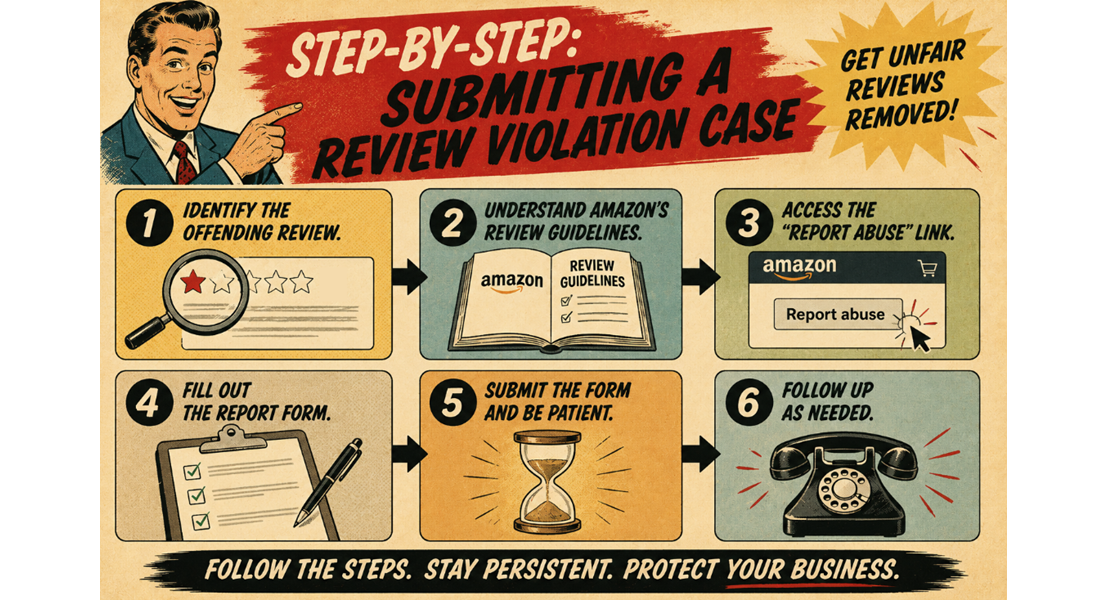
    Step 1: Identify the Offending Review

    First things first, you need to pinpoint the exact review that’s causing you grief. Head over to your product listing and find the review in question. Note down the date of the review and the reviewer’s name (or pseudonym).

    Step 2: Understand Amazon’s Review Guidelines (Know Your Enemy)

    Before you start firing off reports, make sure you know what constitutes a violation. Amazon’s Community Guidelines outline what’s not allowed in reviews. This includes:

    • Promotional content: Reviews that are clearly advertisements for other products or services.
    • Off-topic content: Reviews that have nothing to do with the product itself (e.g., political rants, shipping complaints – though shipping issues should be directed at the seller feedback).
    • Personal information: Reviews that reveal private details about the seller or other customers.
    • Obscene or offensive language: Self-explanatory, hopefully.
    • Bias: Reviews from family members, competitors, or those who have been paid to leave a review (this is a big no-no).
    • Misleading information: Factually incorrect statements about the product.

    Step 3: Access the “Report Abuse” Link (Your Secret Weapon)

    This is where the magic happens (or at least, where you start the process).

    1. Go to the specific product listing where the review is located.
    2. Scroll down to the “Customer reviews” section.
    3. Look for the individual review you want to report. Underneath the review text, you should see a “Report abuse” link. Click on it.
      • Pro Tip: Sometimes, this link isn’t immediately visible. Hovering your mouse over the review might make it appear.

    Step 4: Fill Out the Report Form (Be Clear and Concise)

    Clicking “Report abuse” will usually open a pop-up window or redirect you to a reporting form. Here’s how to fill it out effectively:

    1. Reason for reporting: You’ll likely be presented with a dropdown menu of reasons. Choose the option that best fits the violation you identified in Step 2. Be specific! Don’t just say “it’s a bad review.” Choose something like “The review contains promotional content” or “The review is off-topic.”
    2. Provide details (The “Evidence Locker”): This is crucial. In the text box provided, clearly and concisely explain why you believe the review violates Amazon’s guidelines. Reference the specific points from Step 2. For example:
      • “This review mentions a competing product by name and urges customers to buy that instead.” (Promotional content)
      • “The reviewer is complaining about the shipping speed, which is a fulfillment issue and not related to the product quality.” (Off-topic content)
      • “The reviewer states they received a free product in exchange for this review, which violates Amazon’s policy.” (Bias)
    3. Provide the date and reviewer name (Reinforce the Target): Include the date of the review and the reviewer’s name (or pseudonym) again in your explanation to ensure Amazon knows exactly which review you’re talking about.
    4. Attach evidence (If Applicable): If you have any supporting evidence (e.g., screenshots of messages, social media posts), some reporting systems might allow you to attach them. If not, clearly mention the evidence you possess in your detailed explanation.

    Step 5: Submit and Be Patient (The Waiting Game)

    Once you’ve filled out the form and attached any evidence, hit that “Submit” button. Now comes the hard part: waiting. Amazon’s review moderation team receives a high volume of reports, so it can take some time for them to review your case.

    Step 6: Follow Up (Gentle Nudging)

    If you haven’t heard back from Amazon after a reasonable amount of time (usually a few days to a week), you can try following up through Seller Central. Navigate to your “Customer Feedback” section and see if there’s any update on your reported review. You can also try contacting Seller Support, but be prepared to provide all the details of your initial report.

    Important Considerations (The “Don’t Be That Guy/Gal” Part)

    • Don’t report reviews simply because they are negative. The review must genuinely violate Amazon’s guidelines.
    • Be professional and factual in your reports. Emotional language won’t help your case.
    • Focus on the violation, not the reviewer.
    • Understand that Amazon’s decision is final. Not all reported reviews will be removed.

    Dad Joke Break: Why did the review get a bad grade? Because it didn’t make any cents!

    Take Control

    Tired of unfair reviews dragging down your listing? Take control! Follow this step-by-step guide to report review violations and protect your hard work.

    For more in-depth strategies on managing your Amazon reputation and dealing with negative feedback, book a call and find out how we can help.

    Ecom Triage removes negative Amazon reviews for you.

    Find out how.

  • AI vs. Manual Review Monitoring: Which Wins?

    AI vs. Manual Review Monitoring: Which Wins?

    Let’s face it, sifting through Amazon reviews can feel like panning for gold in a river of… well, let’s just say less-than-golden feedback. You’re looking for those legitimate concerns to improve your product, but you’re also wading through the occasional rant about the delivery driver or someone who clearly mistook your widget for a whozit.

    The question on every savvy seller’s mind lately is: can AI finally take some of this load off our shoulders? Specifically, is it “game over” for manual review monitoring now that GPT and other large language models are in the arena?

    Allure vs Reality

    The allure of letting an AI do the heavy lifting is strong. Imagine a tireless digital assistant that can instantly flag suspicious reviews, identify trends in customer sentiment, and even categorize feedback for product development. No more bleary eyes scanning endless text blocks!

    Tools leveraging AI can analyze the language used, identify patterns indicative of fake reviews (like repetitive phrasing or overly generic praise/criticism), and potentially even assess the emotional tone to detect inconsistencies.

    This can save you precious time and help you focus on actually acting on the feedback, rather than just finding it.

    However, before you fire your virtual review-reading intern (if you had one!), let’s pump the brakes a little. While AI is incredibly powerful, it’s not a perfect replacement for the human touch. Think of it like this: AI is a highly efficient sifter, but a human with experience knows the subtle glint of real gold versus fool’s gold.

    The Manual Advantage

    Here’s where the manual approach still holds significant weight:

    • Context is King: Humans excel at understanding context, nuance, and sarcasm – things that can still trip up even the most advanced AI. A seemingly negative review might actually contain valuable feedback delivered with a touch of humor that an AI could misinterpret.  
    • Evolving Tactics: The folks leaving illegitimate reviews are constantly evolving their tactics. What looks like a bot-generated review today might have a more human-like flair tomorrow. Humans can adapt and identify new patterns more quickly than an AI model that needs to be retrained.
    • Gut Feeling (Based on Experience): Sometimes, you just have a gut feeling about a review based on your deep understanding of your product and customer base. This intuition, honed over time, is something an algorithm can’t replicate.
    • Building Relationships: Engaging with genuine reviewers, even the critical ones, can build rapport and demonstrate your commitment to customer satisfaction. A canned AI response, while efficient, lacks that personal touch.  

    The Winning Strategy: A Hybrid Approach

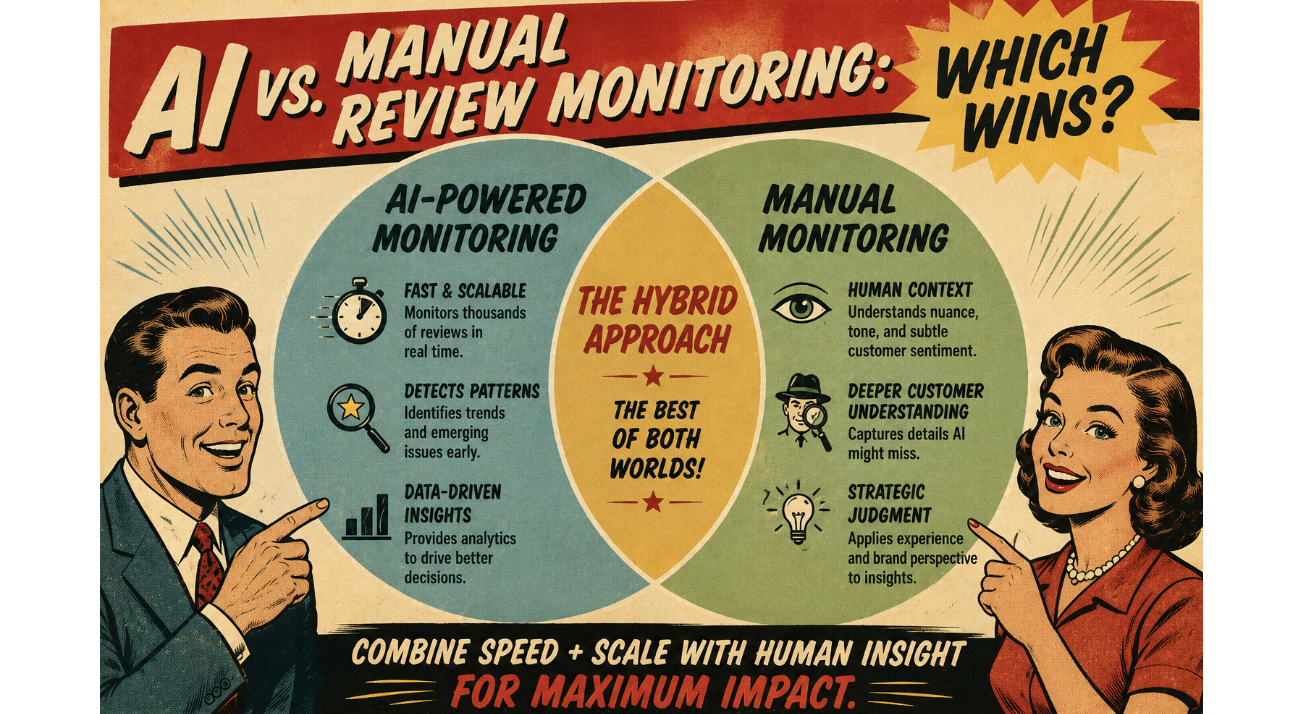
    So, who wins? The answer, as is often the case, lies in the middle. The most effective review monitoring strategy leverages the strengths of both GPT and manual review.

    • Let GPT be your first line of defense: Use AI-powered tools to quickly scan and flag potentially suspicious reviews based on linguistic patterns and anomalies. This significantly reduces the initial workload.  
    • Human oversight is crucial: Experienced team members should then review the AI-flagged reviews to assess the context, identify subtle nuances, and make the final judgment on whether to escalate the review to Amazon.
    • Focus human efforts on genuine feedback: With the AI filtering out the noise, your team can dedicate more time to analyzing legitimate reviews, identifying areas for product improvement, and engaging with customers constructively.
    • Stay updated on AI capabilities: The technology is rapidly evolving. Keep an eye on new advancements in AI-powered review analysis tools and how they can further enhance your strategy.

    Think of GPT as your tireless, detail-oriented assistant, and your human team as the experienced detectives who can read between the lines. Together, they form a powerful force against illegitimate reviews and a valuable asset for understanding your customers.

    Get Rolling Today

    Are you spending too much time sifting through endless Amazon reviews? Discover how eCom Triage can help you implement a smart, hybrid review monitoring strategy to protect your reputation and focus on what truly matters: growing your business.

    Check out our services on our site, and see how we can help you supercharge your ecom business.

  • The Silent ASIN Killer: Search Suppression

    The Silent ASIN Killer: Search Suppression

    Imagine pouring resources into a fantastic product, optimizing your listing to perfection, and even running successful ad campaigns. Everything seems to be going smoothly, and then… crickets. Sales plummet. You check your listing, and it looks fine. What’s going on?

    You might be a victim of the silent ASIN killer: search suppression.

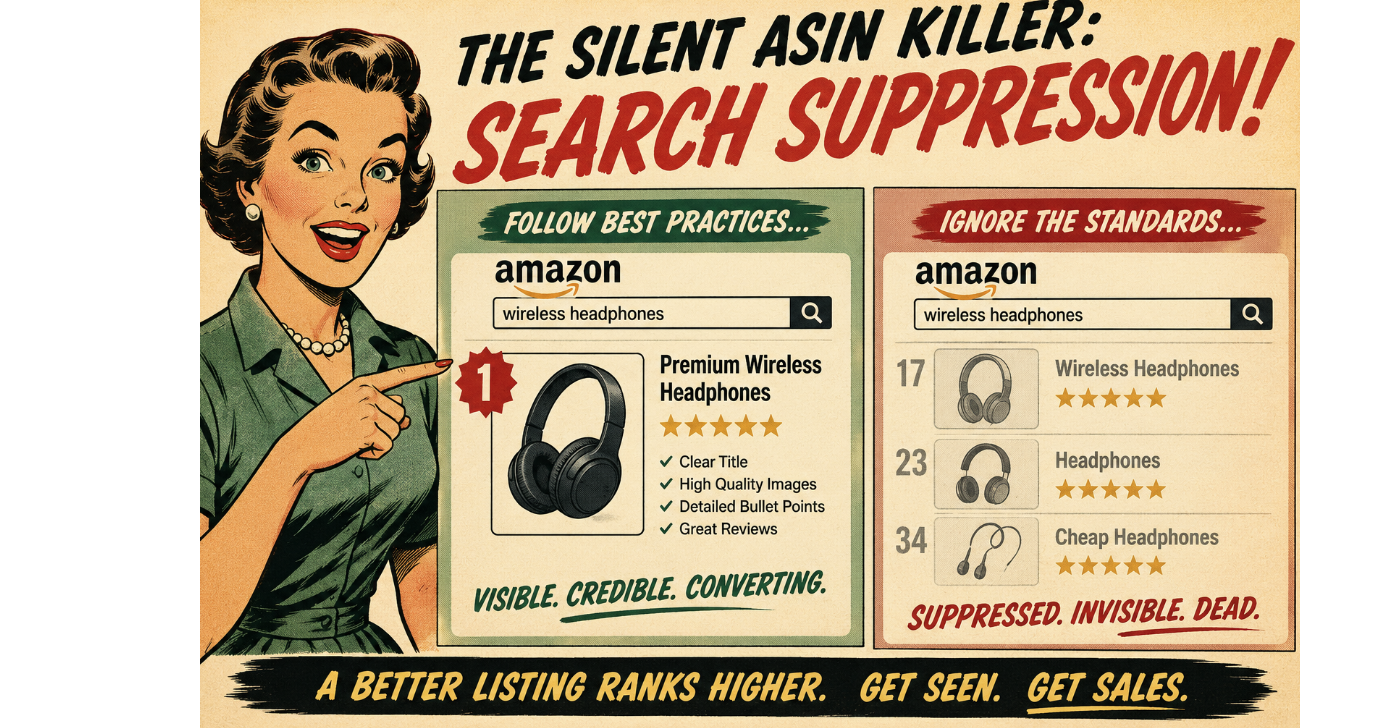
    Search suppression is like your star player being benched without any clear explanation. Your ASIN is still active in your inventory, but it’s no longer showing up in relevant customer searches on Amazon. This can happen for a variety of reasons, often without any immediate notification, making it a particularly insidious threat to your catalog health.

    It’s the silent assassin of your sales, slowly bleeding your revenue without you even realizing the culprit.

    Why Does Search Suppression Happen?

    Amazon’s algorithm is constantly working to provide the best possible shopping experience for its customers. To do this, it has certain standards for product listings. When a listing falls below these standards, the algorithm might silently suppress it from search results to avoid showing incomplete, inaccurate, or potentially misleading information to buyers.

    Here are some common culprits behind search suppression:

    • Missing Key Attributes: Amazon requires certain essential information for each product category. This can include things like brand name, color, size, material, key features, and more. If these vital attributes are missing or incomplete, Amazon might suppress your listing. It’s like trying to order a pizza without specifying the toppings – the system just doesn’t know what to do!
    • Incomplete or Incorrect Product Information: This goes beyond just missing attributes. If your product title is too short or stuffed with irrelevant keywords, your bullet points are vague or poorly written, or your product description lacks essential details, Amazon might deem your listing unhelpful and suppress it. Think of it as trying to follow a recipe with missing ingredients and unclear instructions – you’re likely to end up with a disaster.
    • Low-Quality or Missing Images: In the world of e-commerce, high-quality images are crucial. If your listing has blurry, pixelated, or missing images, or if you don’t have the required number of images from different angles, Amazon might suppress your listing. Customers need to see what they’re buying! It’s like trying to judge a book by its (missing) cover.
    • Policy Violations: Certain product categories have specific guidelines and restrictions. If your listing violates these policies, it could lead to search suppression. This could include issues with product safety, intellectual property, or prohibited items. It’s like trying to bring a prohibited item through airport security – you’ll be stopped.
    • Negative Customer Feedback: While individual negative reviews usually don’t directly cause search suppression, a pattern of negative feedback related to product quality, accuracy of the listing, or safety concerns could trigger the algorithm to suppress the ASIN as a precautionary measure. It’s like the restaurant getting flagged by the health inspector after too many complaints.
    • Technical Glitches: Sometimes, the gremlins in the Amazon machine can cause temporary search suppression. While less common, it’s worth considering if you’ve checked all other potential issues. It’s like your internet randomly going out – frustrating and sometimes hard to pinpoint the exact cause.

    How to Identify and Fix Search Suppression

    • Regularly Monitor Your Listings: Don’t just set it and forget it. Regularly check your listings for any alerts or notifications in Seller Central. Pay attention to any sudden drops in impressions or sales.
    • Use Amazon’s Listing Quality Dashboard: Seller Central has tools to help you identify listings with missing information or potential issues. Utilize these dashboards to proactively improve your catalog health.
    • Compare Your Listing to Top Competitors: See what information they are including in their titles, bullet points, and descriptions. Are you missing any crucial details that they have?
    • Review Amazon’s Style Guides for Your Category: Make sure you are adhering to Amazon’s specific requirements for your product type.
    • Check Your Images: Ensure you have high-quality images that meet Amazon’s guidelines for size, resolution, and number.
    • Look for Performance Notifications: Amazon will sometimes notify you if a listing has been suppressed due to a policy violation. Address these notifications promptly.
    • Run Search Term Reports: If your ads are still running but you’re not seeing organic traffic, your listing might be suppressed.

    Addressing search suppression quickly is crucial to regaining visibility and sales. Regularly auditing your catalog health and ensuring your listings are complete, accurate, and compliant with Amazon’s guidelines is the best way to prevent this silent killer from impacting your business.

    Get (& Use) the Checklist

    Is your ASIN silently suffering? Get our comprehensive checklist for optimizing your Amazon listings and avoiding search suppression pitfalls! Message us here:

    Contact ECom Triage 

  • The 5 Most Common Types of Removable Reviews

    The 5 Most Common Types of Removable Reviews

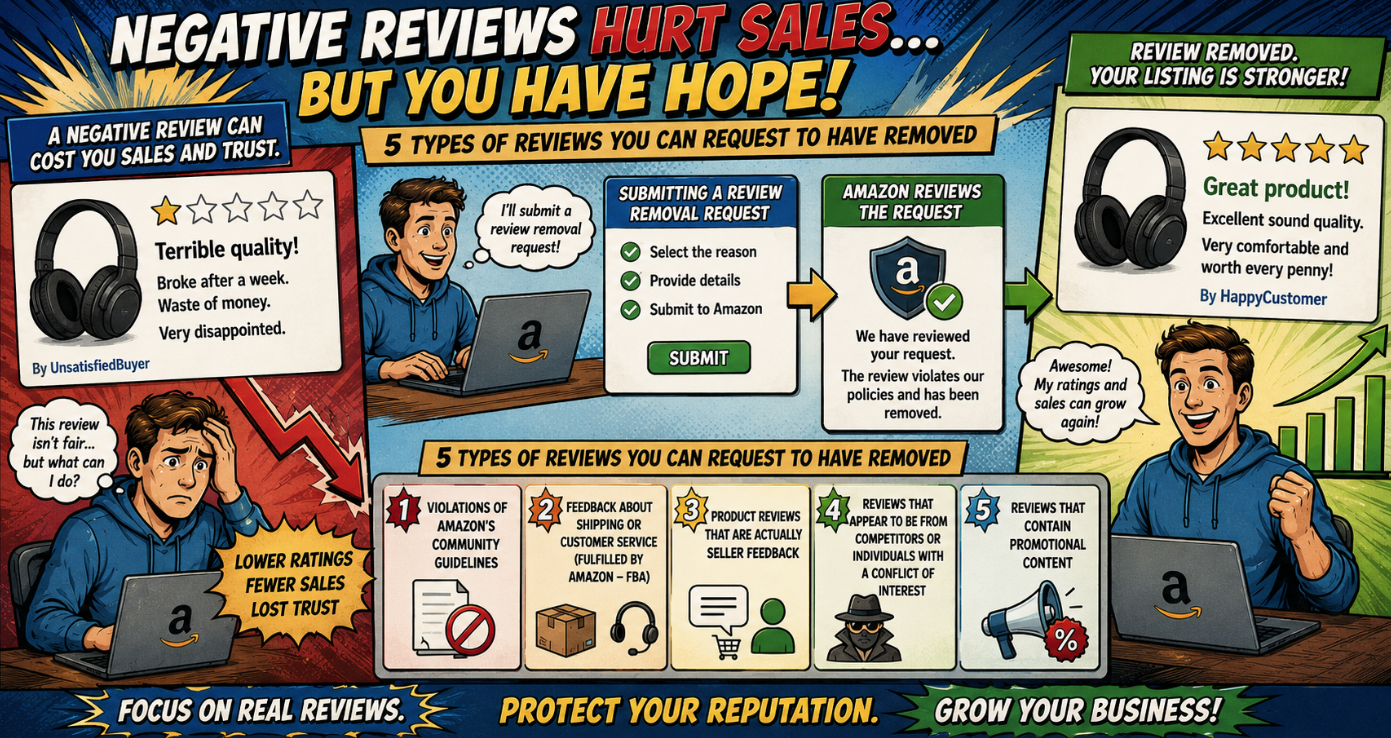
    Let’s face it, negative reviews can feel like a punch to the gut for any Amazon seller. You pour your heart and soul into your products, then BAM! A one-star review pops up, seemingly out of nowhere. But here’s a little secret: not all negative reviews are created equal, and more importantly, not all of them have to stick around like that stubborn uncle at Thanksgiving dinner. Understanding the different types of removable reviews is your first line of defense in protecting your hard-earned reputation and conversion rates. So, grab a cup of coffee (or your preferred beverage – no judgment here!), and let’s dive into the five most common types of reviews that might just qualify for removal.

    #1 Violations of Amazon’s Community Guidelines

    Think of Amazon’s Community Guidelines as the rulebook for leaving reviews. Just like in any good game, there are rules, and when someone breaks them, there are consequences. Reviews that contain obscene or offensive language, promote illegal acts, or include personal information (like phone numbers or addresses) are prime candidates for removal. It’s like showing up to a chess match with a water pistol – not allowed!

    #2 Feedback About Shipping or Customer Service (Fulfilled by Amazon – FBA)

    This is where things get interesting. If a negative review is solely focused on issues related to shipping or the customer service provided by Amazon under their FBA program, you might be in luck. Amazon takes responsibility for these aspects. It’s like blaming the restaurant for a slow delivery when the delivery guy works for a separate service. If the feedback clearly points the finger at Amazon’s fulfillment process and not the product itself, you have a solid case for removal.

    #3 Product Reviews That Are Actually Seller Feedback

    Sometimes, buyers get a little confused and leave feedback about their buying experience (like slow shipping from a third-party seller or poor communication) in the product review section. These are two distinct categories on Amazon for a reason! Product reviews should be about the product itself, its features, and its quality. If a review talks about the seller’s actions rather than the product, it’s misplaced and potentially removable. It’s like reviewing the movie based on the uncomfortable cinema seats – relevant to the experience, but not the main feature.

    #4 Reviews That Appear to Be From Competitors or Individuals With a Conflict of Interest

    This one requires a bit more detective work. If you suspect a review is coming from a competitor trying to sabotage your listing or someone with a clear conflict of interest (maybe a disgruntled ex-employee?), Amazon has policies against this. However, you’ll need to provide compelling evidence. It’s like catching someone trying to swap your prize-winning pumpkin with a rotten one at the county fair – you need proof! Keep an eye out for unusual patterns, similar negative reviews appearing on multiple competitor listings around the same time, or any other red flags.

    #5 Reviews That Contain Promotional Content

    Amazon wants genuine, unbiased opinions. Reviews that include promotional content, such as links to other websites or advertisements for other products, violate their guidelines. It’s like someone sneaking an ad into the middle of a heartfelt testimonial. These types of reviews undermine the integrity of the feedback system and are usually eligible for removal.

    What to Do When You Spot a Removable Review

    • Don’t Panic: Take a deep breath. It happens to the best of us.
    • Carefully Read the Review: Identify the specific reason for the negative feedback. Does it fall into any of the categories above?
    • Report the Review to Amazon: Go to the “Report a Product Review” tool in your Seller Central account. Provide clear and concise reasons why the review violates Amazon’s policies, referencing the specific guideline if possible. Be polite and professional in your communication.
    • Be Patient: Amazon’s review process can take some time. Follow up if you haven’t heard back within a reasonable timeframe.
    • Document Everything: Keep records of the reviews you’ve reported and any communication with Amazon.

    Removing unfair or policy-violating reviews can significantly improve your listing’s performance and maintain customer trust. It’s an ongoing process, but understanding these common types of removable reviews is a crucial step in protecting your Amazon business.

    Contact us for a demo.

  • Our Review Analyzer GPT: Behind the Scenes

    Our Review Analyzer GPT: Behind the Scenes

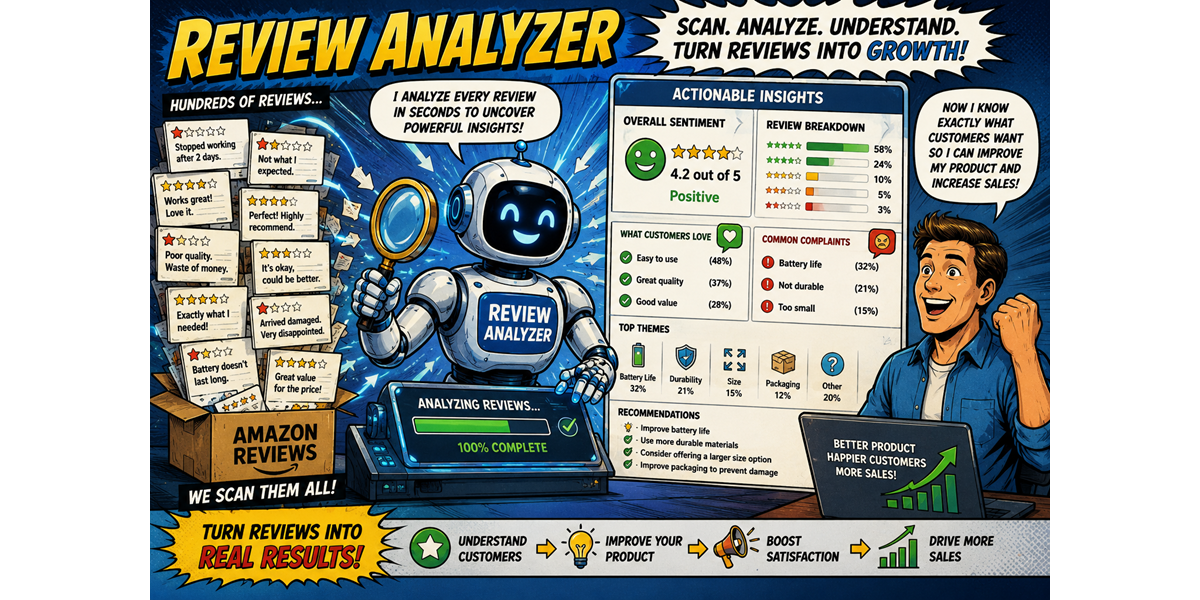
    At eCom Triage, our mission is to empower Amazon sellers by providing actionable solutions to their most pressing challenges. One of the tools we’ve developed to achieve this is our Review Analyzer GPT. This AI-powered tool is designed to help sellers quickly and efficiently understand the sentiment and key themes within their Amazon reviews, ultimately saving time and providing valuable insights for improvement and review removal efforts.

    Today, we’re pulling back the curtain to give you a glimpse behind the scenes of how this tool works and the thinking behind its creation.

    The Pain Point: Overwhelmed by Reviews

    For many Amazon sellers, especially those with a large number of listings and a high volume of reviews, keeping track of customer feedback can feel like drinking from a firehose. Manually reading and analyzing thousands or even hundreds of reviews is incredibly time-consuming and leads to missed insights. Sellers need a way to quickly identify trends, understand customer sentiment, and pinpoint reviews that might violate Amazon’s policies.

    The Birth of the Review Analyzer GPT: Our “Why”

    We recognized this significant pain point and saw the potential of leveraging Natural Language Processing (NLP) and Large Language Models (LLMs) to provide a solution. Our “why” was simple: to create a tool that would empower sellers to:

    • Save Time: Automate the initial analysis of reviews, freeing up valuable time for other critical tasks.
    • Gain Deeper Insights: Identify recurring themes, understand the nuances of customer sentiment beyond just star ratings, and uncover areas for product or service improvement.
    • Streamline Review Removal Efforts: Quickly pinpoint reviews that contain policy violations, making the reporting process more efficient.
    • Improve Customer Understanding: Develop a more nuanced understanding of what customers love and what frustrates them.

    How the Review Analyzer GPT Works: The “How”

    Our Review Analyzer GPT utilizes a combination of techniques to process and analyze Amazon reviews:

    1. Data Ingestion: Sellers can input review data in various formats, such as copying and pasting text, uploading CSV files, or potentially integrating directly with their Amazon Seller Central account (depending on future development).
    2. Natural Language Processing (NLP): At its core, the GPT employs NLP techniques to understand the meaning and context of the text within each review. This involves:
      • Tokenization: Breaking down the review text into individual words or “tokens.”
      • Part-of-Speech Tagging: Identifying the grammatical role of each word (e.g., noun, verb, adjective).
      • Sentiment Analysis: Determining the overall emotional tone of the review (positive, negative, or neutral) and the intensity of that sentiment.
      • Topic Modeling: Identifying the main subjects or themes discussed within the reviews.
    3. Large Language Model (LLM) Power (GPT): The integration of a powerful LLM like GPT allows the tool to go beyond basic sentiment analysis. It can:
      • Understand Context and Nuance: Recognize sarcasm, implied meanings, and complex sentence structures.
      • Identify Policy Violation Indicators: Be trained to recognize keywords, phrases, and patterns that are often associated with Amazon’s review policy violations (e.g., mentions of shipping if FBA is used, personal information, competitor mentions).
      • Summarize Key Findings: Condense large volumes of reviews into concise summaries highlighting the main positive and negative aspects and recurring themes.
      • Categorize Reviews: Group reviews based on specific product features, customer experiences, or potential policy violations.
    4. Output and Visualization: The Review Analyzer GPT presents the analyzed data in a user-friendly format, which might include:
      • Overall Sentiment Score: A numerical or graphical representation of the general sentiment towards the product.
      • Sentiment Breakdown: The percentage of positive, negative, and neutral reviews.
      • Key Themes and Topics: A list of the most frequently discussed topics within the reviews.
      • Example Quotes: Highlighted excerpts from reviews that illustrate different sentiments or recurring themes.
      • Potential Policy Violation Flags: Reviews that the AI identifies as potentially violating Amazon’s policies, along with the reasons for the flag.

    Behind the Training: Feeding the Beast

    The effectiveness of our Review Analyzer GPT relies heavily on the data it’s trained on. Our training process involves:

    • Large Datasets of Amazon Reviews: We utilize vast amounts of publicly available Amazon review data to train the model on the nuances of customer language and sentiment in this specific context.
    • Amazon’s Review Policies: We specifically train the model on Amazon’s Community Guidelines and Customer Product Reviews Policies to help it identify potential violations.
    • Human Expertise: Our team of Amazon experts provides valuable input to refine the model’s accuracy and ensure it aligns with the practical needs of sellers. This includes labeling data, providing feedback on the model’s performance, and guiding its development.
    • Iterative Improvement: Like any AI model, our Review Analyzer GPT is constantly being refined and improved based on user feedback and ongoing testing. We continuously monitor its performance and update its training data to enhance its accuracy and capabilities.

    Our Vision for the Future

    We see the Review Analyzer GPT as an evolving tool that will continue to provide increasing value to Amazon sellers. Our future development plans may include:

    • Direct Integration with Seller Central: Streamlining the data input process.
    • More Granular Sentiment Analysis: Identifying specific aspects of the product or service that are driving positive or negative feedback.
    • Automated Reporting to Amazon: Simplifying the process of reporting policy-violating reviews.
    • Competitive Analysis: Allowing sellers to analyze reviews of their competitors to identify opportunities and threats.

    Empowering Sellers with Insights

    The eCom Triage Review Analyzer GPT is more than just a piece of technology; it’s a tool designed to empower Amazon sellers with the knowledge they need to make informed decisions, improve their products and services, and protect their brand reputation. By providing a clear and efficient way to understand customer feedback, we aim to help sellers turn reviews from a daunting task into a valuable source of insights and a catalyst for growth.

    The Power of Insight

    Ready to unlock the power of your Amazon reviews? Learn more about the eCom Triage Review Analyzer GPT and how it can help you save time, gain valuable insights, and streamline your review management process.

    Contact us for a demo or to learn about early access opportunities.

  • How to Use Review Removal as a Launch Strategy

    How to Use Review Removal as a Launch Strategy

    Launching a new product on Amazon is an exhilarating yet challenging endeavor. You’ve poured time and resources into development, sourcing, and listing optimization. But even with a stellar product and a compelling listing, the initial hurdle of gaining traction and building social proof can feel insurmountable.

    Here’s a potentially unconventional yet powerful strategy: leveraging legitimate review removal to create a positive initial perception and accelerate your launch.

    The Chicken and Egg Problem of New Product Launches

    Every new Amazon product faces the same fundamental challenge: no reviews. In a marketplace driven by social proof, a listing with zero reviews often gets overlooked. Potential customers are hesitant to be the first to take a chance, and without that initial momentum, your product can languish in the search results, no matter how great it is.

    Traditionally, sellers focus on generating reviews through various (and often slow) methods like early reviewer programs, Vine, or post-purchase review requests. While these are important long-term strategies, they don’t address the immediate need for positive social proof during the crucial launch phase.

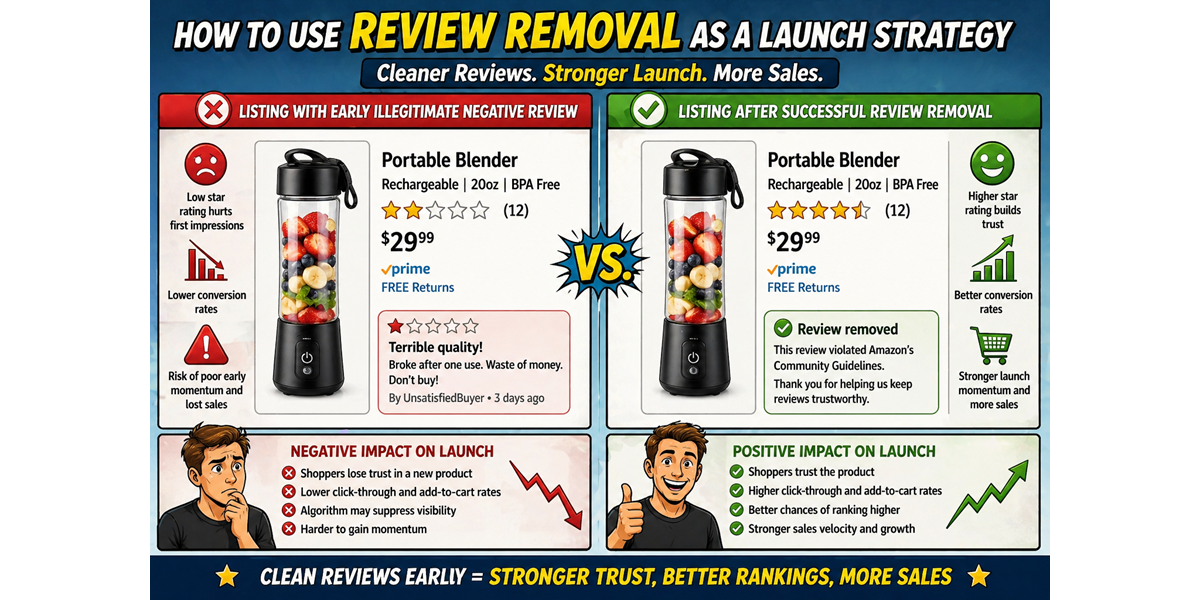
    The Power of a Clean Slate: Removing Illegitimate Negative Reviews Early

    This is where a strategic approach to review removal comes in. Instead of solely focusing on getting positive reviews, consider proactively identifying and removing any illegitimate negative reviews that might appear early on. Why? Because even one unfair or policy-violating negative review on a brand new listing can be disproportionately damaging.

    With no positive reviews to balance it out, it can kill your momentum before it even begins.

    What Constitutes an “Illegitimate” Negative Review?

    It’s crucial to understand that we’re not talking about manipulating or faking reviews. We’re focusing on identifying and removing reviews that violate Amazon’s own policies. These include reviews that:

    • Do not pertain to the product: Reviews about shipping issues (when you use FBA), seller feedback, or unrelated topics.
    • Contain personal information: Reviews that include names, contact details, or other private information.
    • Are clearly biased: Reviews from direct competitors or individuals with a clear conflict of interest.
    • Use abusive or offensive language: Reviews that violate Amazon’s community guidelines.
    • Are based on a fundamentally different product: If a customer mistakenly reviews your new product based on a previous purchase of something else.
    • Violate Amazon’s review creation guidelines in other ways.

    How Removing Illegitimate Negative Reviews Aids Your Launch

    • Creates a More Positive Initial Impression: By removing unfair negative feedback, you ensure that the first potential customers see are either no reviews (a neutral starting point) or, ideally, genuine positive reviews you start to acquire.
    • Boosts Conversion Rates: A clean or predominantly positive review section early on builds trust and encourages those initial purchases, which are crucial for gaining traction in the algorithm.
    • Increases Organic Visibility: Higher conversion rates signal to Amazon that your product is resonating with customers, which can lead to improved organic ranking over time.
    • Protects Your Brand Reputation: Early negative feedback, even if illegitimate, can tarnish your brand image before you’ve had a chance to establish it. Removing it safeguards your initial reputation.
    • Improves Advertising Effectiveness: When you start driving traffic to your listing through advertising, a clean review section increases the likelihood of those clicks converting into sales, improving your ACoS.
    • Builds Confidence for Future Review Generation: A positive initial reception can encourage genuine customers to leave positive reviews, creating a virtuous cycle.

    Implementing Review Removal as a Launch Strategy (The Right Way)

    1. Thoroughly Monitor New Reviews: As soon as your product launches, diligently monitor all incoming reviews. Set up alerts to be notified immediately of any new feedback.
    2. Understand Amazon’s Review Policies Inside and Out: Familiarize yourself with the latest version of Amazon’s Community Guidelines and Customer Product Reviews Policies. This is crucial for identifying legitimate violations.
    3. Objectively Assess Each Negative Review: Don’t automatically assume every negative review is illegitimate. Carefully analyze the content to see if it genuinely violates Amazon’s policies.
    4. Report Policy Violations Through Seller Central: If you identify a review that clearly violates Amazon’s policies, report it through the designated channels in Seller Central. Provide clear and concise evidence of the violation, referencing the specific policy if possible.
    5. Be Patient and Persistent (Within Reason): Amazon’s review removal process can take time, and they don’t always grant removal requests. Be prepared to follow up politely if necessary, but avoid bombarding them with repetitive requests.
    6. Focus on Generating Positive Reviews Compliantly: While removing illegitimate negatives is a valuable initial tactic, it’s not a substitute for a long-term strategy of ethically generating positive reviews from satisfied customers.

    Important Considerations

    • Don’t Abuse the System: Only report reviews that genuinely violate Amazon’s policies. Falsely reporting legitimate negative feedback can have serious consequences for your account.
    • Focus on Product and Service Improvement: While removing unfair reviews helps with initial perception, the best long-term strategy is to offer a high-quality product and excellent customer service to minimize negative feedback in the first place.
    • Review Removal is Not a Replacement for Review Generation: It’s a complementary tactic to help you get off to a stronger start. You still need a robust strategy for acquiring positive reviews over time.

    Launching with Confidence

    By strategically leveraging the legitimate removal of policy-violating negative reviews during your initial launch phase, you can create a more positive first impression, boost early conversion rates, and build a stronger foundation for long-term success on Amazon. It’s about ensuring that your product gets a fair chance to shine without being unfairly hampered by illegitimate negative feedback right out of the gate.

    Do This

    Launching a new product on Amazon? Let eCom Triage help you start strong. Our expertise in Amazon’s review policies can help you identify and address unfair negative feedback that could hinder your initial momentum.Contact us here for a consultation on your launch strategy.